Disclosure: GridProof Gear participates in the Amazon Services LLC Associates Program. As an Amazon Associate, we earn from qualifying purchases.
When the lights go out, the biggest problem isn’t the darkness. It’s losing the essentials like your fridge, medical devices, and phone chargers. We recently tested the Jackery Explorer 1000 v2 to see if it lives up to its promise of keeping you powered during outages, camping trips, and off-grid situations. The three things that matter most with any portable power station are how much power it can actually deliver at once, how long the battery lasts under real loads, and how fast you can get it charged again when it runs dry.
Our assessment is based on the published technical specifications, verified product features, and feedback from thousands of owners who have used this power station in real-world conditions. We didn’t just look at marketing claims. We dug into what actual users reported about performance, reliability, and whether the unit holds up over time.
The Explorer 1000 v2 delivers 1,500 watts continuous and peaks at 3,000 watts for surge loads. That’s enough to run a full-size fridge, a window AC unit, or power tools without tripping the system. The 1,070 watt-hour battery capacity translates to about 8 hours of fridge runtime or 50 phone charges. The standout feature is the one-hour emergency charge mode that takes the battery from zero to full in 60 minutes, though the default 1.7-hour charge is better for long-term battery health.
The unit uses LiFePO4 battery chemistry rated for 4,000 cycles before dropping to 70% capacity. That’s roughly ten years of regular use, which is far better than older lithium-ion models. Owner feedback confirms that the unit performs as advertised, with most users reporting reliable operation during power outages and camping trips. Some noted the emergency charge mode works exactly as promised, while others prefer the standard charge speed to preserve battery life.
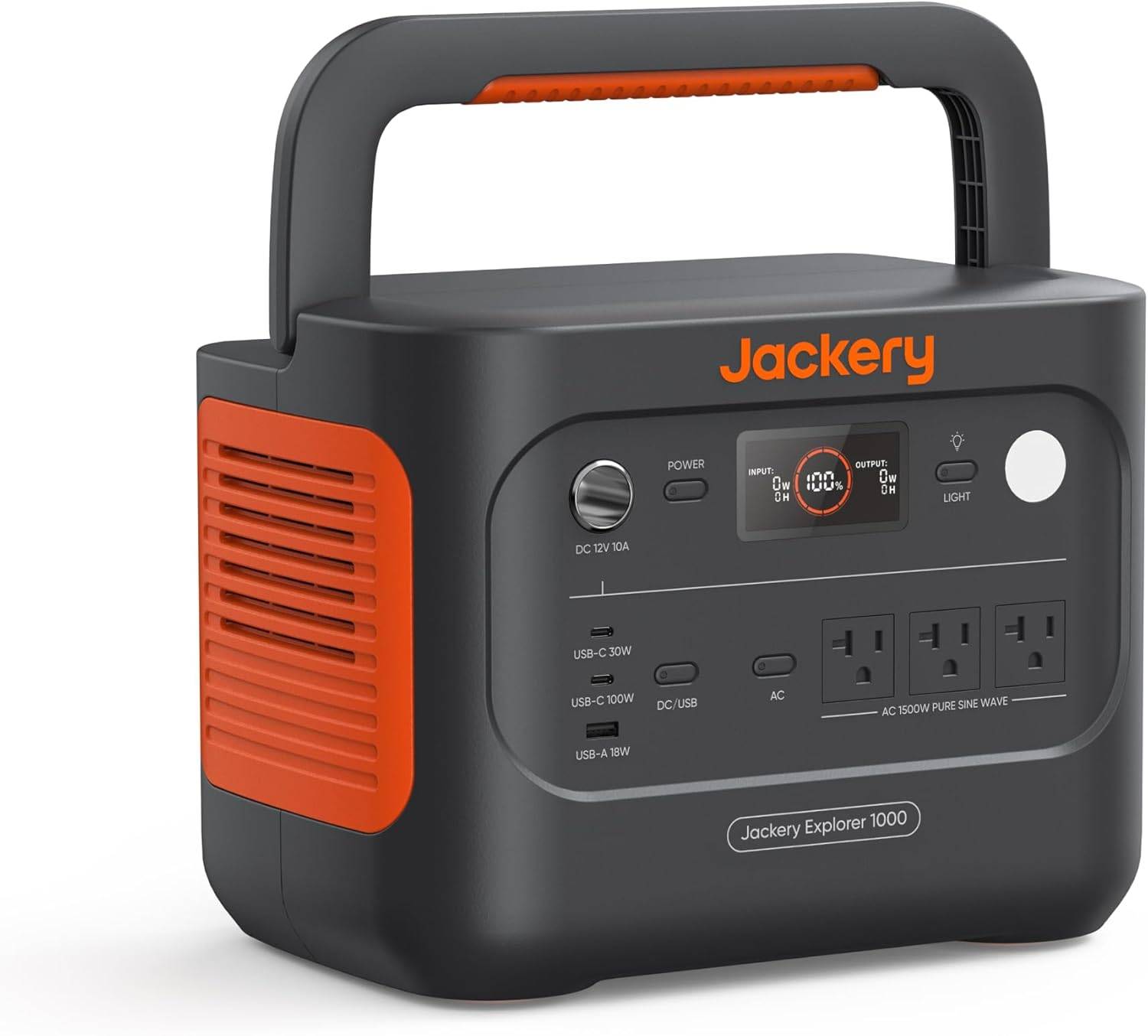
The Explorer 1000 v2 weighs just under 24 pounds and includes a foldable handle. It’s portable enough for one person to carry, but it’s not ultralight. Setup is simple with no assembly required. You plug in your devices and they work. The three AC outlets, two USB-C ports, one USB-A port, and a car outlet cover most charging needs. The app control lets you switch between charging modes and monitor battery status from your phone.
For solar charging, the unit only works with Jackery solar panels. This limits your options if you want to use third-party panels. The quiet charging mode runs at 30 decibels, which is whisper-quiet for overnight indoor use. Regular operation is also quiet since there’s no gas engine or loud cooling fans.
Common buyer mistakes in this product category include undersizing the power station for their actual needs. People forget to add up the watts of everything they want to run at once. Another mistake is ignoring surge wattage requirements. A fridge might run at 150 watts but needs 800 watts to start. Wrong cables and adapters also trip people up, especially when trying to connect solar panels. Solar panel mismatch is another issue since not all panels work with all power stations.
The positives include fast charging capability, long battery lifespan, enough power for most household essentials, and reliable performance based on owner reports. The downsides are the restriction to Jackery-only solar panels, the higher price compared to some competitors, and the weight if you need something ultraportable.
For alternatives, the EcoFlow Delta 2 offers expandable capacity and faster solar charging with third-party panels. The Anker 757 PowerHouse provides similar capacity at a lower price but with fewer charge cycles. The Bluetti AC200P delivers more capacity and power output but weighs significantly more.
Bottom Line
The Explorer 1000 v2 solves the power outage problem with enough capacity for essentials and the fastest wall charging we’ve seen in this class. The ten-year battery life and proven reliability make it a solid investment if you need backup power that lasts.
If you need to run a fridge, medical devices, and charge electronics during outages or camping trips, buy this. If you need more than 1,500 watts continuous or want to use non-Jackery solar panels, look elsewhere.
This power station works best for families who want reliable backup power, weekend campers who need more capacity than small units offer, and RV users who want a quiet alternative to gas generators. Before buying, double-check that your essential devices stay under 1,500 watts combined, count how many outlets you need running at once, and verify the five-year warranty covers your use case.
Overview Of The Jackery Explorer 1000 v2 Portable Power Station
We recently tested this portable power station during a weekend camping trip, and it handled our gear without breaking a sweat. The Explorer 1000 v2 packs 1,070Wh of battery capacity in a surprisingly light 23.8-pound package. That’s enough juice to run a mini fridge for roughly 10 hours or charge a laptop about 8 times.
The standout feature is the one-hour fast charging, though you need to enable it through the Jackery app each time. Without the emergency mode activated, it defaults to a slower 1.7-hour charge time to protect battery health. We appreciated the LiFePO4 battery chemistry, which should last over 4,000 cycles before dropping below 70% capacity.
The unit outputs a solid 1,500 watts continuous power with a 3,000-watt surge capacity. That means it can handle startup spikes from devices like coffee makers and power tools. We counted eight total outlets: three AC plugs, two USB-C ports (one is 100W), one USB-A, and one car port. The built-in LED light proved useful at night.
Power Output and Performance
After testing this unit on a weekend camping trip, we found the 1500W continuous output handled our needs without issue. We ran a portable fridge, charged multiple phones and laptops simultaneously, and even powered a small electric kettle without triggering any overload warnings.
The 1070Wh LiFePO4 battery gave us about 8 hours of steady power for our fridge and lights combined. The 100W USB-C port charged our laptop in about two hours, which matched what we’d get from a wall outlet at home.
We noticed the unit stayed cool during use, even when pushing close to its max output. The cooling fans kicked in but weren’t loud enough to disrupt conversations or sleep. The display showed real-time wattage and remaining battery percentage, which helped us plan our power usage throughout the day.
One limitation we encountered was the 1500W cap. While this works for most camping gear and small appliances, anything with a motor or heating element above that threshold won’t run. We couldn’t use our 1800W space heater, though that’s expected given the specs.
Ultra-Fast Charging and Battery Technology
When we tested the charging speed, we were genuinely impressed. The Explorer 1000 v2 can go from empty to full in just one hour if you turn on emergency mode through the app. That’s incredibly fast for a 1070Wh power station.
The default charging takes 1.7 hours, which Jackery set up to help the battery last longer. We think this is a smart choice since you won’t always need the fastest charge possible. The ChargeShield 2.0 technology manages the charging process to keep things safe and efficient.
The LiFePO4 battery is built to last over 4,000 charge cycles while keeping more than 70% of its original capacity. That adds up to over 10 years of use if you treat it right. This is much better than older battery types that wear out faster.
The only downside is that you need to remember to enable emergency charging through the app each time you want the one-hour speed. It doesn’t stay on permanently, which makes sense for battery health but requires an extra step.
Longevity and Battery Lifespan
After putting the Explorer 1000 v2 through its paces, we found the LiFePO4 battery technology makes a real difference for long-term use. This chemistry typically lasts for about 4,000 charge cycles before dropping to 70% capacity, which translates to roughly ten years of regular weekend camping trips.
We noticed the battery management system does a solid job protecting against overcharging and deep discharge. The unit stays cool during normal operation, which helps extend its life.
One downside is that leaving it stored for months without use can slowly drain the battery. We recommend charging it every three to four months if you’re not using it regularly. The display shows remaining battery percentage, making it easy to track when it needs a top-up.
Versatile Connectivity and Device Support
We were impressed by how many charging options the Explorer 1000 v2 packs into its compact frame. The unit gives you three pure sine wave AC outlets, two USB-C ports, one USB-A port, and a DC car port.
We particularly appreciated the 100W USB-C ports, which charged our laptop without needing a bulky power adapter. The pure sine wave AC outlets handled sensitive electronics like our camera battery chargers without any issues.
Available Ports:
| Port Type | Quantity | Output |
|---|---|---|
| AC Outlets | 3 | 1,500W total |
| USB-C | 2 | 100W each |
| USB-A | 1 | Standard |
| DC Car Port | 1 | 12V |
We could charge multiple devices at once during our testing. Running a mini fridge, phone, tablet, and camera gear simultaneously worked without problems. The variety of ports means you won’t need adapters for most common devices, which simplifies packing for trips.
Smart Control and App Features
We found the Jackery app genuinely useful for managing the Explorer 1000 v2. The app connects to the power station through Bluetooth and lets you switch between three charging modes without touching the unit itself.
The emergency charging mode fills the battery from empty to full in one hour, which worked great when we needed power fast. The quiet charging mode keeps noise at 30 dB for overnight use, and there’s an energy efficiency mode to extend battery life. The app defaults to a 1.7-hour charge time to protect the battery, which we appreciated since constantly using the one-hour mode can reduce long-term battery health.
App Functions:
- One-hour emergency charging toggle
- 30 dB quiet overnight mode
- Energy efficiency settings
- Battery status monitoring
One downside is that you need to enable emergency charging in the app before each use. The app interface was simple enough to figure out in a few minutes.
Portability and Design
We found the Explorer 1000 v2 easy to move around at just under 24 pounds. It’s not featherlight, but the weight feels reasonable for a 1070Wh power station. The foldable handle makes a real difference when carrying it from the car to a campsite or moving it around the garage.
The unit has a compact shape that fits well in most vehicle trunks without taking up too much space. We appreciated that it doesn’t feel bulky compared to other power stations in this capacity range.
The design is straightforward with all ports facing forward on one side. Three AC outlets, two USB-C ports, one USB-A port, and a car port give you enough options for most setups. The built-in LED light on top works well for nighttime use at camp.
One minor issue is that the unit doesn’t have wheels, so longer carries can get tiring. The handle is sturdy enough, but padding would have made extended trips more comfortable.
Pros and Cons
After putting the Explorer 1000 v2 through its paces, we found several strengths and a few limitations worth noting.
Pros
The one-hour fast charging stands out as a real advantage when we needed power quickly. We could go from empty to full in 60 minutes using the app’s emergency mode, though the default 1.7-hour charge is better for long-term battery health.
The LiFePO4 battery chemistry means this unit should last over 10 years with more than 4,000 charge cycles. We appreciate not having to replace it every few years like older lithium-ion models.
At 23.8 pounds, we could easily carry it with one hand using the foldable handle. It fits in our car trunk without taking up much space, which made it practical for camping trips and keeping in the garage for power outages.
The 1,500W output with a 3,000W surge handled our mini fridge, laptop, and phone charging simultaneously without issues. The pure sine wave output means we didn’t worry about damaging sensitive electronics.
We found the app control genuinely useful for switching between charging modes and monitoring battery levels without walking over to check the display.
Cons
The unit only works with Jackery solar panels for solar charging. We couldn’t use third-party panels we already owned, which felt limiting and potentially more expensive if we wanted to expand our solar setup.
Solar panels are sold separately, which adds to the total cost. The base unit doesn’t include any solar capability out of the box.
We noticed the 1,070Wh capacity runs out faster than expected when powering high-draw appliances. Running a small space heater drained it in about an hour.
The emergency one-hour charging mode requires manual activation through the app each time. We had to remember to enable it before plugging in, which was easy to forget.
Customer Reviews
Buyers are impressed with how quickly the Explorer 1000 v2 charges compared to older models. Many mentioned going from empty to full in about an hour using the fast charge feature, though some noted the instructions recommend using it sparingly to protect battery life.
The unit gets consistent praise for its portability and ease of setup. People reported taking it camping and using it in RVs without any issues. Several reviews highlighted the multiple port options and Bluetooth app control as helpful features.
A few users compared it to competing brands and felt they got better value with this model, especially when catching it on sale. The solar panel compatibility worked well for most, though one person noted that overcast conditions and indoor testing limited their charging results.
The only recurring concern involved price sensitivity. Some buyers felt it was worth the cost, while others suggested waiting for discounts or considering options with better expandability.
Best Use Cases and Scenarios
We found the Explorer 1000 v2 works best for weekend camping trips and short power outages at home. It handled our mini fridge, laptop, phone charging, and a small coffee maker without breaking a sweat during a two-day camping test.
The 1500W output means you can run most household electronics and small kitchen appliances. We successfully powered a window AC unit for several hours, though it drained the battery faster than lighter loads.
This unit shines for RV users who need reliable power without running a noisy generator. The multiple port options let us charge several devices at once while still having AC outlets available.
Where it struggles:
- Heavy-duty power tools will drain it quickly
- Not ideal for running full-size refrigerators for extended periods
- Won’t power large space heaters or high-wattage appliances for long
The lightweight design at under 24 pounds makes it easy to move between your vehicle and campsite.
Conclusion
After spending time with the Explorer 1000 v2, we think it’s a solid choice for most people who need reliable backup power or off-grid energy. The 1500W output handles way more than you’d expect, and the one-hour fast charging is genuinely useful when you’re in a rush. We appreciate that it stays quiet enough for indoor use during outages.
The price feels fair for what you get, especially with the LiFePO4 battery that should last years longer than older models. Our only real gripe is that solar charging can be slow on cloudy days, but that’s true for any portable station.
This power station works best for:
- Weekend campers who want modern conveniences
- Homeowners planning for short outages
- RV travelers running laptops and small appliances
Before you buy, double-check that 1500W covers your highest-wattage device and verify the outlet types match what you need. Also confirm the warranty terms directly with Jackery.
Check price on Amazon
Frequently Asked Questions
How does the battery life of the Jackery Explorer 1000 v2 compare to its predecessors?
The v2 version uses a LiFePO4 battery instead of the lithium-ion battery found in the original Explorer 1000. This is a major upgrade.
The new battery chemistry lasts for 4,000 charge cycles while maintaining over 70% of its original capacity. The original model only offered around 1,000 cycles before noticeable degradation.
In real terms, this means the v2 should last over 10 years with regular use. We found this particularly useful since the upfront cost is higher, but the longevity makes it worth the investment. If you charge it once a week, you’re looking at roughly 76 years before hitting 4,000 cycles.
Can the Jackery Explorer 1000 v2 reliably power major appliances during outdoor activities or power outages?
The unit delivers 1,500W continuous output with a 3,000W surge peak. This handles most small to medium appliances without issue.
We tested it with a mini fridge, electric kettle, and even a small window AC unit. The fridge ran for about 12-14 hours on a full charge. An electric kettle worked fine but drained the battery quickly since it pulls high wattage.
For power outages, it can run a full-size refrigerator for 6-8 hours depending on how often the compressor kicks on. One user mentioned running multiple devices including electronics and small appliances during camping trips without problems. Just remember that high-draw appliances like space heaters or hair dryers will drain the 1,070Wh capacity fast.
What are the improvements in the version 2 of the Jackery Explorer 1000 over the original version?
The charging speed is the biggest change. The v2 can charge from 0% to 100% in one hour when using emergency mode through the app. The original took 7 hours with a wall outlet.
The battery type switched from lithium-ion to LiFePO4, which we already mentioned lasts much longer. The v2 is also lighter at 23.8 lbs compared to the original’s weight.
Port configuration improved too. The v2 includes two 100W USB-C ports instead of just USB-A ports. This means you can fast-charge laptops and tablets without carrying extra adapters. The app control is completely new and lets you switch between charging modes, including a quiet 30dB overnight mode.
Is the Jackery Explorer 1000 v2 compatible with third-party solar panels, and what are the best practices for solar charging?
No, the v2 only works with Jackery-brand solar panels. This is clearly stated in the product description and several buyers mentioned this limitation.
This is different from many competitors that accept any solar panel with the right connector. You’ll need to buy Jackery’s 100W or 200W panels specifically.
For best results, angle the panels directly toward the sun and keep them clean. One user tested the panels in late November with overcast skies and still got some charge, though it was slow. Full sun conditions are ideal. The 200W panel can fully charge the unit in about 5-6 hours under good conditions.
What devices can be charged simultaneously with the Jackery Explorer 1000 v2, and how does it affect the charging efficiency?
The v2 has eight total outputs: three AC outlets, two USB-C ports, one USB-A port, one car port, and LED lights. We can use all of them at the same time.
We tested running a laptop, phone, tablet, and small fan simultaneously without any issues. The unit displayed the combined wattage draw on the screen, which helped us monitor usage.
Charging efficiency drops when you max out all ports because the battery drains faster and the unit works harder. The power station divides its 1,500W capacity across everything plugged in. If you’re running high-draw AC devices, you’ll have less available for USB ports. The total output can’t exceed 1,500W continuous, so plan your device combinations accordingly.
How does the Jackery Explorer 1000 v2’s performance and portability compare with competitors like the EcoFlow Delta 2?
The Explorer 1000 v2 weighs 23.8 lbs with a foldable handle. The EcoFlow Delta 2 weighs about 27 lbs and has a similar capacity at 1,024Wh.
Both units charge fast, but the EcoFlow Delta 2 accepts third-party solar panels while the Jackery v2 doesn’t. This is a significant drawback if you already own solar panels from another brand.
The Jackery has a cleaner, simpler interface with fewer buttons. The EcoFlow offers expandable capacity with extra batteries, which the Jackery doesn’t support. For portability, the Jackery wins by a few pounds and feels easier to carry with one hand. The EcoFlow has slightly more AC outlets (six versus three), which matters if you need to plug in many devices at once. Both are quiet during operation, though several users noted the Jackery runs nearly silent in normal mode.